

Class 9 Computer Science Chapter 1 SEBA : Basics of Computer System – Important Question Answers
Class 9 Computer Science Chapter 1 SEBA : Basics of Computer System, Basics of Computer System class 9 seba computer science, Class 9 Computer Science Chapter 1 seba question answers, chapter 1 computer science class 9 seba, computer science class 9 chapter 1 seba
SEBA Class 9 Computer Science Chapter 1 – Basics of Computer System: This page provides exercise questions and answers, solutions and explanations for SEBA Class 9 Computer Science Chapter 1. The answers are written in simple and easy-to-understand language to help students understand the important concepts and prepare effectively for their examinations.
Class 9 Computer Science Chapter 1: Exercise Questions and Answers
1. Choose the correct option :–
a) Which of the following is not an output device?
i) Speaker ii) Mouse iii) Printer iv) Monitor
Ans: ii) Mouse
b) Which one of the following is the “brain “ of a computer?
i) CPU ii) ALU iii) CU iv) MU
Ans: i) CPU
c) A collection of eight bits is called …………………
i) Byte ii) Word iii) Record iv) Nibble
Ans: i) Byte
d) Second generation computers were manufactured using which technology?
i) Vacuum tubes ii) Transistors iii) ICs iv) None of these
Ans: ii) Transistors
e) Storage of 1KB means the following number of bytes
i) 1000 ii) 1024 iii) 1064 iv) 1012
Ans: ii) 1024
f) Which of the following is not a hardware?
i) Hard disk ii) Printer iii) Assembler iv) CPU
Ans: iii) Assembler
g) Fourth generation computers used
i) Vacuum tubes ii) Transistors iii) Microprocessors iv) IC’s
Ans: iii) Microprocessors
h) Which of the following is a special purpose application software?
i) Word processing software ii) Operating System software iii) Computer iv) Payroll system
Ans: iv) Payroll system
i) The base of Octal Number System is ……….
i) 2 ii) 10 iii) 16 iv) 8
Ans: iv) 8
j) Who is known as the father of the modern computer?
a) Charles Babbage b) Blaise Pascal c) Herman Hollerith d) Jon Atanasoff
Ans: a) Charles Babbage
(Class 9 Computer Science Chapter 1 SEBA : Basics of Computer System, Basics of Computer System class 9 seba computer science, Class 9 Computer Science Chapter 1 seba question answers, chapter 1 computer science class 9 seba, computer science class 9 chapter 1 seba)
2. Fill in the blanks :-
a) The first generation computers used magnetic drums for storage.
b) The third generation computers replaced transistors with integrated circuits (ICs).
c) Registers are high speed and temporary storage area.
d) Bit is the short form of binary digit.
e) A group of four bits is called Nibble
f) RAM holds data, programs and instructions for computer.
g) A microphone is input device.
h) A Program is set of instructions to perform a specific task.
i) Antivirus software are used to scan the computers for viruses.
j) The decimal system is composed of 10 digits.
k) ENIAC was the first fully electronic general-purpose computer.
l) UNIVAC I was one of the first commercially available computers.
m) An Assembler converts the program written in assembly language into the machine language.
n) Processing takes place in the Central Processing Unit (CPU).
o) The ALU performs the Arithmetic and Logical operations.
p) RAM is volatile.
q) ROM stores basic input/output instructions to operate the computer.
r) EEPROM is an electronic non- volatile storage medium that can be electrically erased and reprogrammed.
s) Data and instructions are given to the computer through its input device.
t) Raw data is processed by the computer to produce Information.
u) Results are obtained from the computer through its output device.
v) 1 MB = 1024 KB.
w) RAM is an example of primary memory.
x) The Octal number system uses the digits from 0 to 7.
y) A computer system comprises both Hardware and Software
z) Software represents the set of program that directs the computer how to work.
3. State True or False :-
a) Another name for internal memory is primary memory. True
b) A hard disk can store less data than CD. False
c) Software represents to the physical components of a computer. False
d) A projector is an input device. False
e) Interpreter is an utility software. False
f) The first generation computers used transistors. False
g) Atanasoff Berry Computer was the first electronic digital computers. True
h) IBM 604 is an example of second generation computers. True
i) UNIVAC I was one of the first commercially available computers. True
j) ROM is volatile. False
k) A group of eight bits is called nibble. False
l) Computer does not understand any language other than machine language. True
m) Pen drives use flash memory to store data. True
n) The monitor is a soft copy output device. True
o) A compiler translates a program written in machine language into a program written high level languages. False
p) Bit is the smallest unit of data in a computer. True
4. Short Answer Questions
a) Who is known as the “father of the modern computer”?
Ans: Charles Babbage is known as the father of the modern computer.
b) What is a computer?
Ans: A computer is an electronic device that accepts data, processes it and gives information as output.
c) Name a popular pointing device.
Ans: Mouse.
d) Who invented Jacquard’s loom?
Ans: Joseph Jacquard invented Jacquard’s loom.
e) Give the full form of ENIAC and EDVAC.
Ans:
i) ENIAC: Electronic Numerical Integrator and Computer.
ii) EDVAC: Electronic Discrete Variable Automatic Calculator.
f) Give two examples of second-generation computers.
Ans: IBM 604 and IBM 1401.
g) What is AI?
Ans: AI (Artificial Intelligence) is a technology that enables computers to perform tasks like human beings.
h) Give two examples of secondary memories.
Ans: Hard disk and Pen drive.
i) What does the CPU do?
Ans: The CPU processes data and controls the operations of a computer. It is called the brain of the computer.
j) Why do we use secondary memory?
Ans: We use secondary memory to store data and programs permanently.
k) Give two examples of pointing devices.
Ans: Mouse and Trackball.
l) Which input device is used to record sound?
Ans: A microphone is used to record sound.
m) What is the use of a barcode reader?
Ans: A barcode reader is used to read information from a barcode.
n) What is system software? Give two examples.
Ans: System software is used to operate hardware and control the internal operations of a computer. Two examples are Operating System and Language processors.
o) What is the role of CU?
Ans: CU (Control Unit) controls and coordinates all the components of a computer system.
p) What is the function of ALU?
Ans: The ALU does arithmetic calculation and takes logical decisions.
q) What do you understand by memory word?
Ans: A memory word is a group of bits used to store data or instructions.
r) What is the function of a compiler?
Ans: A compiler converts the high-level language program into machine language.
s) What is the main limitation of a computer?
Ans: A computer cannot think or make decisions on its own. It cannot respond to a particular situation unless it has already been programmed to do so.
t) Mention three main features of a computer.
Ans:
i) Speed – Computers can work at a very high speed.
ii) Accuracy – Computers give accurate results when the data and instructions are correct.
iii) Versatility – Computers can do different types of work efficiently.
u) What is a computer program?
Ans: A computer program is a set of instructions to perform a specific task.
v) What are the fundamental components of a computer system?
Ans: The fundamental components are Input Unit, CPU, Memory Unit and Output Unit.
w) What is application software?
Ans: Application software is a set of programs designed to perform specific tasks for users.
x) Mention various categories of application software.
Ans:
i) General-Purpose application software
ii) Specific-Purpose application software
y) What do you understand by computer memory?
Ans: Computer memory is the storage area to store data and instructions.
z) What is the binary equivalent of hexadecimal 15?
Ans: The binary equivalent of hexadecimal 15 is 1111.
(Class 9 Computer Science Chapter 1 SEBA : Basics of Computer System, Basics of Computer System class 9 seba computer science, Class 9 Computer Science Chapter 1 seba question answers, chapter 1 computer science class 9 seba, computer science class 9 chapter 1 seba)
5. Long answer questions :-
a) Mention four features of a computer system?
Ans:- Four features of a Computer system are:
i) Speed: Computers can perform millions of instructions in a second.
ii) Accuracy: Computers give accurate results without making mistakes.
iii) Diligence: Computers do not get tired while doing repetitive tasks.
iv) Versatility: Computers can perform different types of tasks efficiently.
b) Mention the characteristic features of third- generation computers?
Ans :- Characteristic Features of Third-Generation Computers:
- They used Integrated Circuits (ICs) instead of transistors.
- They were faster and more efficient.
- They were smaller, more reliable, and powerful.
- They were less expensive.
- Examples: IBM 360 and IBM 370 series.
c) What do you understand by generation of computers? Mention two disadvantages of first generation computers?
Ans:- Generation of computers means the different stages of development in computer technology. Each generation is based on a major technological change.
Two Disadvantages of First-Generation Computers
- They were very large, expensive, and consumed a lot of electricity.
- They could solve only one problem at a time.
d) Describe the functioning of CPU.
Ans :- The CPU is the brain of a computer system. In a computer system, all calculations and comparisons are made inside the CPU and the CPU is also responsible for activating and controlling the operations of other units of a computer system.
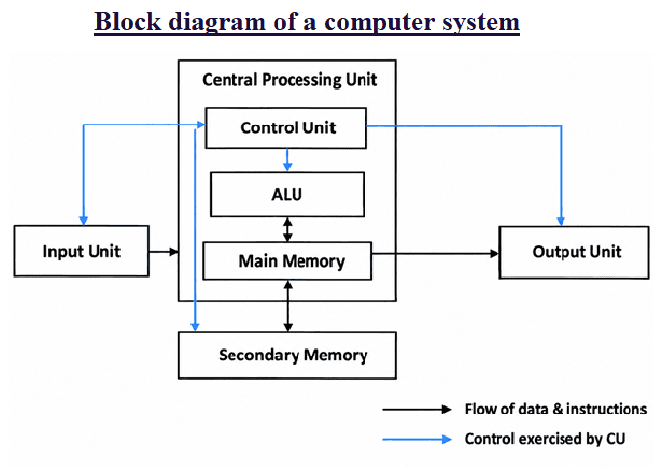
e) Draw a block diagram of a computer system.
Ans :- The block diagram of a computer system is given below:-
f) What are the categories of Printers? Explain.
Ans:- Printers are mainly divided into two categories: Impact printers and Non-Impact printers.
i) Impact Printer: It prints by making physical contact with the paper.
Types: Character printers and Line printers.
ii) Non-Impact Printer: It prints without physical contact with the paper.
Types: Inkjet printers, Laser printers and Thermal printers.
g) What is a bus? Explain three types of buses.
Ans: A bus is a set of electrical wires that connects different parts of a computer and transfers data and signals between them.
The three types of buses are:
i) Data Bus: It carries data between the CPU and memory.
ii) Address Bus: It carries the address from the CPU to the memory.
iii) Control Bus: It carries control signals between the CPU and other parts of the computer.
h) What are the functions of primary storage area?
Ans :- Functions of Primary Storage are as follows:
- It stores input data and instructions.
- It stores data and instructions during processing.
- It stores intermediate results.
- It stores the final results.
i) Explain three types of ROM.
Ans: The three types of ROM are:
i) PROM: It stands for Programmable Read-Only Memory. Data can be written into it only once using a special programmer.
ii) EPROM: It stands for Erasable Programmable Read-Only Memory. Its data can be erased using ultraviolet (UV) light and programmed again.
iii) EEPROM: It stands for Electrically Erasable Programmable Read-Only Memory. Its data can be erased using electricity and programmed again.
j) What is the purpose of language processor? Explain the three language processors.
Ans: A language processor is a system software that converts a program written in assembly language or high-level language into machine language.
The three language processors are:
i) Assembler: It converts assembly language into machine language.
ii) Compiler: It converts the whole high-level program into machine language at once.
iii) Interpreter: It converts and executes a high-level program line by line.
k) Differentiate between data and information.
Ans :- Differentiate Between Data and Information:
Data :- Data means raw facts and figures or unprocessed data. Data can be anything for example marks obtained by a student in various subjects and his roll number form data.
Information :- Information means processing of unprocessed data or meaningful data. For example Computer prepares result sheets using these data, which is the information.
l) Write short note on fifth generation computers.
Ans: Fifth-generation computers are based on Artificial Intelligence (AI). They are designed to work more like human beings.
- They use AI and advanced technology.
- They can understand voice and natural language.
- Parallel processing helps them work faster.
- Examples: Voice recognition and language translation systems.
m) What are the basic differences between four generation of computers?
Ans: The Basic Differences Between Four Generations of Computers are given below:
| Generation | Technology | Features | Examples |
| First Generation | Vacuum tubes | Very large, slow, expensive and consumed much electricity | ENIAC, UNIVAC-I |
| Second Generation | Transistors | Smaller, faster and more reliable | IBM 1401 |
| Third Generation | Integrated Circuits (ICs) | Faster, smaller, more powerful and reliable | IBM 360, IBM 370 |
| Fourth Generation | Microprocessors | Very small, fast, affordable and user-friendly; led to personal computers | IBM PC, Apple Macintosh |
n) Write a short note on Mark- I.
Ans: Mark-I was one of the first electromechanical computers. It was developed by Howard Aiken with the help of IBM in 1944.
- It was very large in size.
- It used electrical switches and mechanical parts.
- It could perform basic mathematical calculations automatically.
- It was also known as Harvard Mark-I.
o) Explain the two main types of secondary memory.
Ans: Secondary memory is mainly divided into two types:
i) Magnetic Media: It stores data using magnetic technology.
Examples: Floppy disk, hard disk and magnetic tape.
ii) Optical Media: It stores data using laser technology.
Examples: CD, DVD and Blu-ray disc.
p) Describe various types of magnetic media?
Ans: The main types of magnetic media are:
i) Floppy Disk: It is a small and portable storage device. It can store about 1.44 MB of data. It is rarely used today.
ii) Hard Disk: It stores data on magnetic disks called platters. It has a large storage capacity and is used to store data in computers.
iii) Magnetic Tape: It is used to store large amounts of data. It is commonly used for backup and archiving.
q) Mention some areas where computers are used widely.
Ans: Computers are widely used in many areas, such as:
i) Education: Computers are used for online classes, examinations, e-books, teaching, preparing results and question papers.
ii) Banking: Computers are used for maintaining accounts and online banking.
iii) Business: Computers are used for keeping records, preparing bills and managing accounts.
iv) Hospitals: Computers are used for maintaining patient records and medical tests.
v) Communication: Computers are used for sending emails, video calls and sharing information.
r) What are the major operations performed by a computer?
Ans: A computer performs five major operations:
- Input: It accepts data and instructions.
- Processing: It processes the data.
- Storage: It stores data and information.
- Output: It displays the results.
- Control: It controls all the operations of the computer.
(Class 9 Computer Science Chapter 1 SEBA : Basics of Computer System, Basics of Computer System class 9 seba computer science, Class 9 Computer Science Chapter 1 seba question answers, chapter 1 computer science class 9 seba, computer science class 9 chapter 1 seba)
s) Differentiate between the following pairs:
I) Differentiate between Input Unit and Output Unit.
Ans:-
| Input Unit | Output Unit |
| It consists of input devices used to enter data and instructions into a computer. | It consists of output devices used to display or produce results. |
| It converts input into a form that the computer can understand. | It converts processed data into a form that the user can understand. |
| Examples: Keyboard, Mouse, Scanner, Microphone. | Examples: Monitor, Printer, Speaker. |
II) Differentiate between RAM and ROM.
Ans:-
| RAM | ROM |
| RAM stands for Random Access Memory. | ROM stands for Read Only Memory. |
| It is volatile memory. | It is non-volatile memory. |
| Data is lost when the power is switched off. | Data is retained even when the power is switched off. |
III) Differentiate between Softcopy and Hardcopy.
Ans:-
| Softcopy | Hardcopy |
| Softcopy is the electronic form of data or information. | Hardcopy is the printed form of data or information. |
| It is displayed on a screen. | It is printed on paper. |
| It cannot be physically touched. | It can be seen and touched. |
IV) Differentiate between Primary Memory and Secondary Memory.
Ans:-
| Primary Memory | Secondary Memory |
| It is the main memory of a computer. | It is used for long-term storage of data. |
| It is faster. | It is slower than primary memory. |
| Examples: RAM and ROM. | Examples: Hard disk, SSD, Pen drive. |
V) Differentiate between Impact Printer and Non-Impact Printer.
Ans:-
| Impact Printer | Non-Impact Printer |
| It prints by making physical contact with the paper. | It prints without making physical contact with the paper. |
| It is generally noisier. | It is generally quieter. |
| Examples: Dot matrix and line printers. | Examples: Inkjet and laser printers. |
VI) Differentiate between Assembler and Compiler.
Ans:-
| Assembler | Compiler |
| It converts assembly language into machine language. | It converts a high-level language program into machine language. |
| It is used for assembly language. | It is used for high-level programming languages. |
| Example: An assembler for Assembly language. | Examples: C and C++ compilers. |
VII) Differentiate between Hardware and Software.
Ans:-
| Hardware | Software |
| Hardware is the physical part of a computer. | Software is a set of programs or instructions. |
| It can be seen and touched. | It cannot be physically seen or touched. |
| Examples: Keyboard, Monitor, CPU, Hard disk. | Examples: Windows, MS Word, Paint. |
VIII) Differentiate between System Software and Application Software.
Ans:-
| System Software | Application Software |
| It controls and manages the computer system. | It is designed to perform specific tasks for users. |
| It helps the computer hardware to work properly. | It helps users perform particular tasks. |
| Examples: Windows, Linux, macOS. | Examples: MS Word, Excel, Photoshop. |
Related to Class 9 Computer Science Chapters of SEBA:
- Chapter 2 SEBA : Operating System and Its Importance
- Chapter 3 SEBA : Office Application
- Chapter 4 SEBA : Introduction to Internet
Important Points to Remember About Computer Systems
- A computer is an electronic device that processes data.
- The CPU is known as the brain of the computer.
- The CPU consists of the ALU, CU and registers.
- RAM is a volatile memory. ROM is a non-volatile memory.
- A computer system consists of hardware and software.
- Input devices are used to enter data into a computer.
- Output devices display or provide the processed information.
Class 9 Computer Science Chapter 1 SEBA : Basics of Computer System, Basics of Computer System class 9 seba computer science, Class 9 Computer Science Chapter 1 seba question answers, chapter 1 computer science class 9 seba, computer science class 9 chapter 1 seba
Some important things about “Class 9 Computer Science Chapter 1 SEBA : Basics of Computer System”
In the SEBA Class 9 Computer Science syllabus, Chapter 1: Basics of Computer System lays the foundational knowledge required to understand how a computer processes data into meaningful information. A computer system is an electronic device that accepts raw data, processes it according to a set of instructions, produces processed output, and stores the results for future use. This fundamental sequence is known as the IPO (Input-Process-Output) Cycle.
Core Components of a Computer System
A functional computer system consists of four primary hardware units that work together seamlessly:
- Input Unit: Hardware devices used to enter raw data and instructions into the computer. Common examples include the keyboard, mouse, scanner, and microphone.
- Central Processing Unit (CPU): Known as the brain of the computer, the CPU executes program instructions and processes data. It is subdivided into three critical units:
- Arithmetic Logic Unit (ALU): Performs all mathematical calculations (addition, subtraction) and logical comparisons (equal to, greater than).
- Control Unit (CU): Acts as the supervisor, directing operations, fetching instructions from memory, and managing the flow of data between components.
- Registers: High-speed, temporary storage locations inside the processor used during execution.
- Memory/Storage Unit: Retains data and instructions for processing:
- Primary Memory (Internal Memory): Includes RAM (Random Access Memory), which is volatile and holds active tasks, and ROM (Read Only Memory), which is non-volatile and contains permanent boot instructions (BIOS).
- Secondary Memory (External Storage): Non-volatile magnetic, optical, or flash storage devices used for long-term data retention, such as Hard Disk Drives (HDD), Solid State Drives (SSD), and USB drives.
- Output Unit: Devices that display or present processed results to the user in a human-readable format. Examples include monitors, printers, and speakers.
Hardware vs. Software and Software Classification
A computer system cannot function with hardware alone; it requires software to instruct the hardware components on how to perform operations.
- Hardware: The physical, tangible parts of the computer system (e.g., CPU, RAM, Keyboard, Monitor).
- Software: A set of programs, procedures, and rules that tell the hardware what to do. Software is broadly divided into two main categories:
- System Software: Programs designed to manage system resources and provide a platform for application software. Examples include Operating Systems (Windows, Linux), Device Drivers, and Language Translators (Compilers, Interpreters).
- Application Software: Programs built to perform specific tasks for the user. This includes general-purpose software like Word Processors and Web Browsers, or customized software like School Management Systems and Billing Software.
Mastering these foundational concepts in Chapter 1 prepares students for understanding operating systems, office applications, and basic algorithm design in subsequent chapters of the SEBA Class 9 curriculum.