

Class 10 Computer Science Chapter 1 SEBA : Introduction to Computer Network – Exercise Answers
SEBA Class 10 Computer Science Chapter 1 – Introduction to Computer Network: Get complete questions and answers, notes, solutions and study materials for Class 10 Computer Science based on the SEBA/SCERT Assam syllabus. This chapter covers the important concepts of Computer Networks, including basic networking concepts, types of networks, network devices and related topics.
These SEBA Class 10 Computer Science Chapter 1 solutions are prepared to help students understand the chapter easily and prepare effectively for their examinations. Students can use the chapter-wise questions and answers for revision, homework and exam preparation.
SEBA Class 10 Computer Science Chapter 1 – Introduction To Computer Network : Exercise Questions and Answers :
I. Fill in the Blanks
1. The hostname command is used to display ____________.
Answer: The name of the computer.
2. The length of an IPv4 and an IPv6 is __________ and __________ bytes respectively.
Answer: 4 bytes and 16 bytes respectively.
(IPv4 = 32 bits and IPv6 = 128 bits.)
3. An access point is used to connect ____________.
Answer: Wireless networks.
4. The ping command is used to ____________.
Answer: Verify the connectivity between two computers.
5. HTTPS transfers __________ data.
Answer: Encrypted data.
II. Multiple Choice Questions
1. Which device is required to connect multiple heterogeneous networks?
(A) Hub
(B) Switch
(C) Router
(D) Access Point
Answer: (C) Router
2. Which is the largest type of computer network?
(A) PAN
(B) LAN
(C) MAN
(D) WAN
Answer: (D) WAN
3. Which protocol transfers encrypted data instead of plain data?
(A) HTTP
(B) HTTPS
(C) FTP
(D) SMTP
Answer: (B) HTTPS
4. How many bytes are reserved for OUI in a MAC address?
(A) 3
(B) 8
(C) 24
(D) 12
Answer: (A) 3 bytes
Note: OUI is 24 bits = 3 bytes. Some online solutions incorrectly give “24” as the answer because they confuse bits with bytes.
5. IP address can be automatically assigned if the network is connected with:
(A) Access Point
(B) Mail Server
(C) Web Server
(D) DHCP Server
Answer: (D) DHCP Server
III. Short Answer Questions
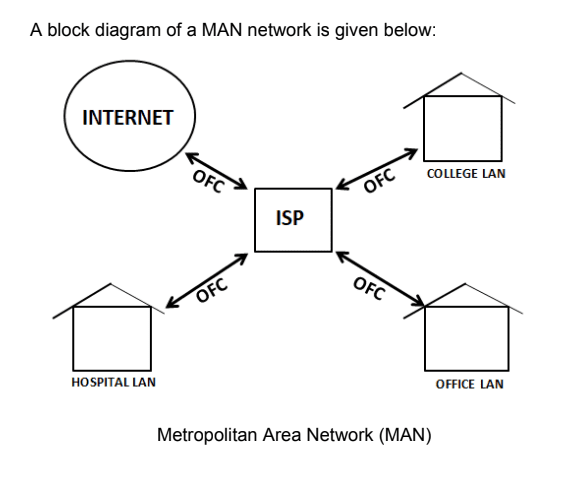
1. Mention the name of components required to set up a MAN network. Draw a block diagram of a MAN network labelling the name of each component.
Answer: MAN (Metropolitan Area Network) connects different LANs within a city or a large area. The main components required to set up a MAN are:
- Computers or LANs
- Switches
- Routers
- Communication cables such as optical fibre
- Other networking devices
2. Why should hostname not be used to identify a computer in a computer network?
Answer: A hostname can be changed. Also, two computers may have the same hostname. Therefore, a hostname cannot be used as a unique identification of a computer in a network.
3. Give five examples of valid and five examples of invalid IPv4 addresses.
Answer: An IPv4 address has four numbers separated by dots. Each number can be from 0 to 255.
Valid IPv4 addresses:
- 172.16.254.2
- 172.16.254.3
- 172.16.254.4
- 172.16.254.5
- 172.16.254.6
Invalid IPv4 addresses:
- 210.258.110.25 — 258 is greater than 255.
- 119.230 — It has only two parts.
- 172.16.300.1 — 300 is greater than 255.
- 192.168.1.256 — 256 is greater than 255.
- 10.20.30 — It has only three parts.
4. Can we compare HTTP and FTP protocols? Mention their functionality.
Answer: Yes, we can compare HTTP and FTP protocols.
| HTTP | FTP |
|---|---|
| HTTP stands for HyperText Transfer Protocol. | FTP stands for File Transfer Protocol. |
| It is mainly used to access web pages and web resources. | It is mainly used to transfer files. |
| It is used between a web browser and a web server. | It is used to upload and download files. |
5. How many 16-port switches are required to connect 31 computers in a network?
Answer: A 16-port switch has 16 ports. One port of the first switch is used to connect the server, and one port is used to connect the second switch.
- First switch → 14 computers
(1 port for server + 1 port for second switch) - Second switch → 15 computers
(1 port for first switch) - Third switch → 2 computers
(1 port for second switch and13 ports remain free)
Total = 14 + 15 + 2 = 31 computers. Therefore, 3 numbers of 16-port switches are required to connect 31 computers in the network.
Important Points to Remember:
- A computer network connects two or more computers or devices to share data and resources.
- PAN, LAN, MAN, and WAN are different types of computer networks.
- A LAN covers a small geographical area, while a WAN covers a large geographical area.
- A switch connects multiple devices within a network.
- A router is used to connect different networks.
- An access point is used to connect wireless devices to a network.
- IPv4 is a 32-bit address, while IPv6 is a 128-bit address.
- An IPv4 address contains four parts, and each part ranges from 0 to 255.
- The hostname identifies a computer by name, but it may be changed and is not necessarily unique.
- The ping command is used to check connectivity between computers.
- HTTP is mainly used to access web pages, while FTP is used to transfer files.
- HTTPS transfers encrypted data.
- A DHCP server can automatically assign IP addresses to devices.
- A MAC address is a unique hardware address associated with a network interface.
- A MAN connects multiple LANs within a city or large geographical area.
Conclusion:
This chapter introduces the basic concepts of computer networks, including different types of networks, networking devices, IP addresses, protocols, and network commands. Understanding these concepts helps students learn how computers communicate and share information over a network. The questions and answers in this chapter are useful for Class 10 SEBA examination preparation, revision, and practice.